
We understand it can be worrying to receive unexpected emails about your account — especially ones that threaten you with losing your address. There is a lot of phishing about at the moment, much of it designed to look as though it comes from us. This page shows some real examples and explains how to tell the genuine from the fake.
Examples of phishing emails pretending to be from us
All of these are fakes. Click any image to see it larger.


The most important thing to know
Our links are always written out in full so you can read where they go. We don't use coloured buttons or "Click here" links that hide their real destination. If an email claiming to be from us has a button that hides its web address, treat it as suspicious.
We do sometimes send links to log in — for example in your first welcome email, or if you ask us where to find webmail. But the link will always be written out so you can see it goes to https://mail.mail.coop (for webmail) or https://mail.coop (for our main website).
If you've followed a link and arrived at a login page, check before typing your password:
- The web address in your browser bar should start with
https://mail.mail.coop— nothing else. Notmail-coop.com, notmailcoop.net, notmail.coop.something-else.com. - You should see the same SOGo webmail login screen you always use. If it looks different, stop.
- If anything looks unfamiliar, close the page and go to mail.mail.coop by typing it into your browser yourself.
This is our genuine login page — the one you should see at https://mail.mail.coop:

mail.mail.coop in the browser bar — that's what you should see. If you've followed a link and arrived somewhere that looks like this but the address bar shows anything else, close the page.Watch out for the "click to stop something bad" trick
Scammers know that telling you to "click here to log in" looks suspicious. So they often flip it round and ask you to click to prevent something:
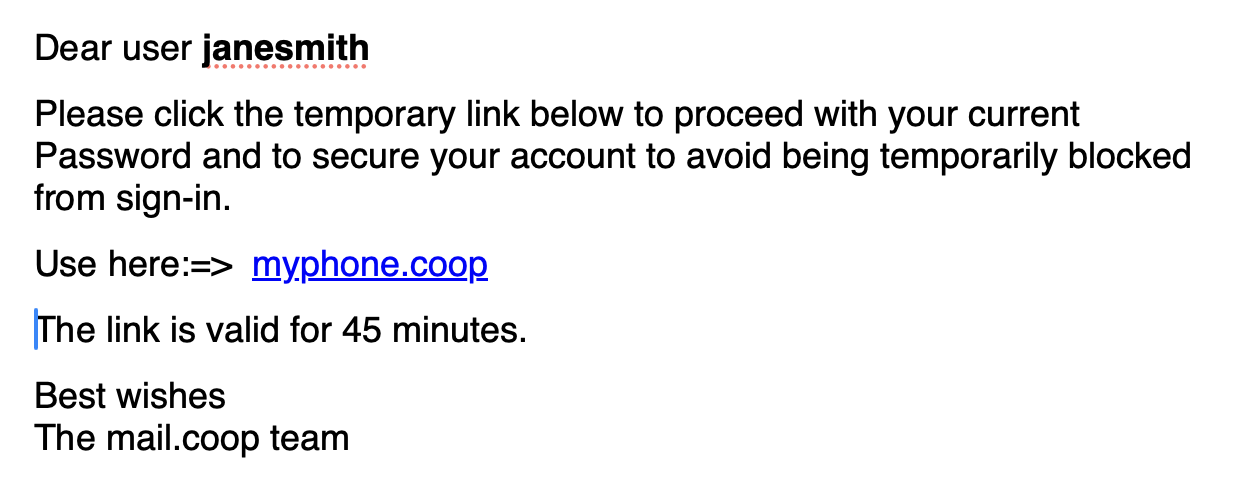
- "Your password has expired — click here to keep the same password."
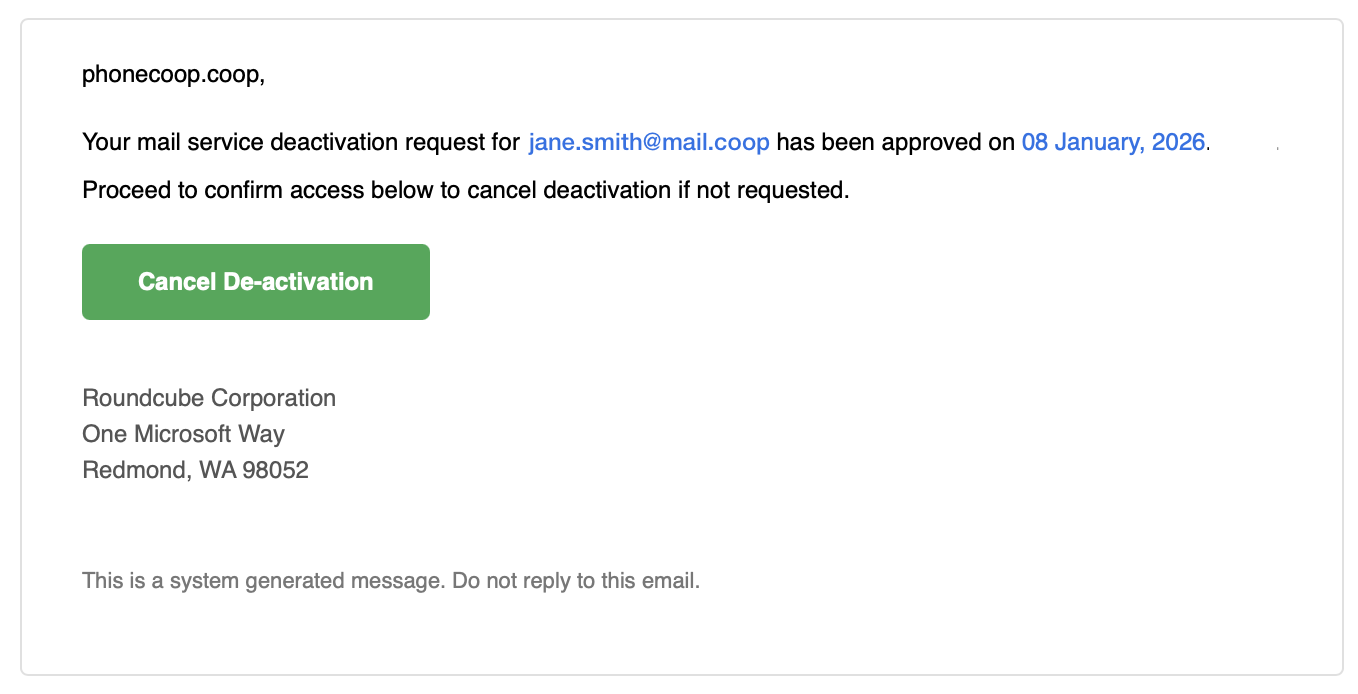
- "Your account is being deactivated — click here to cancel the deactivation."
- "We're about to delete your messages — click here to save them."
- "You'll be temporarily blocked from signing in — click within 45 minutes to secure your account."
It's the same trick scam phone calls use: "We're about to charge your card £900 — press 2 if this wasn't you." The offer to stop something feels helpful rather than pushy, so you're more likely to click without thinking. The example above, from August 2026, works exactly this way — offering to let you keep your current password if you act quickly.
We do send genuine emails with cancel links in them — for example, your renewal email includes a way to cancel your subscription. The difference is that ours never warn you that something bad is about to happen unless you act. If an email is asking you to click in order to stop something, be especially careful.
Other quick checks
Signs it's probably a scam:
- Generic greeting — "Dear Customer", "Dear User", "Attention Email User", just your email address, or even just your domain name like "phonecoop.coop,". We always use your actual name.
- Threats or urgency — "Your account will be deleted in 24 hours", "FINAL WARNING", "Act now or lose access", "your account is being deactivated". We don't write like this.
- Poor English — spelling mistakes, odd grammar, strange punctuation like "12 Augus,t 2025", or stilted phrases like "Proceed to confirm access below".
- Asking for your password — we will never ask for your password by email, for any reason.
- QR codes — we never use them. If you see one, it's a scam.
- Strange sender address — even if the display name says "mail.coop support", check the actual address. Random letters and numbers like
usaerio96@irrestal.comare a giveaway. - Nonsense company names or addresses — sign-offs from invented companies, or famous addresses copy-pasted in (like Microsoft's "One Microsoft Way, Redmond"). We're mail.coop — based in the UK.
- Supposed company names based on your email address: the cooperative that provides your email services is called mail.coop - our name is not 'phonecoop.coop' or 'myphone.coop' so "© 2026 phonecoop.coop.All rights reserved." is a giveaway.
- Common pretexts — "confirm your email", "your password has expired", "you're out of storage", "messages held for review", "verify your account", "your account is being deactivated — click to cancel". These are all standard phishing hooks.
Signs it's probably genuine:
- Your actual name in the greeting.
- Specific details like your renewal date or "£24 per year".
- No pressure — our renewal reminders give weeks of notice.
- Polite, plain English with no threats.
- Links written out in full, starting with
https://mail.coop/orhttps://mail.mail.coop/. - From one of our real addresses:
billing@mail.coophello@mail.coopnoreply@mail.mail.coopyourcoopemailsupport@midcounties.coop
If you're not sure — don't click
You always have time to check. Real emails from us don't expire in hours, and we will never tell you that something bad is about to happen to your account unless you click a button.
- Don't click any links in the email.
- Go to mail.coop yourself by typing it into your browser. Anything you need to do (renew, change password, upgrade) you can start from there.
- Or forward the email to hello@mail.coop asking "Is this real?"
- Or call us on 01608 434 000.
More detail, if you'd like it
Types of genuine emails we send
Renewal reminders come from billing@mail.coop when your renewal date is near or recently passed. They include a link to https://mail.coop/renew/... which you can read before clicking. The link takes you to our website (with our logo) and never asks for your password. You can always renew instead by visiting mail.coop directly and clicking Renew now.
Quarantine notices come from noreply@mail.mail.coop and list specific emails being held as possible spam, with "Release to inbox" and "Delete" options. These are the ones scammers fake most often, so check the sender carefully and hover over any link to confirm it goes to https://mail.mail.coop/...
Occasional updates from hello@mail.coop about changes or improvements. These may link to FAQs but never require urgent action.
Checking the sender and links
Click or hover over the sender's name to see the real email address, not just the display name. The part after the @ should match one of our domains exactly.
To check where a link goes, hover over it without clicking. Most email programs show the real destination at the bottom of the screen. It should start with https://mail.coop/ or https://mail.mail.coop/.
If you think you've been caught out
- Change your mail.coop password straight away at mail.mail.coop.
- If you entered your password anywhere else (banking, etc.), change those too.
- Let us know — forward the phishing email to hello@mail.coop marked "Suspicious email", and tell us what happened. We won't judge — these emails are designed to fool people.
As a co-operative, we're here to help, not threaten. When in doubt, just ask.
Contact us: hello@mail.coop or 01608 434 000